
Screen resolution, colour reproduction and viewing comfort explained – and why we upgrade to Full HD as standard.
Many laptops, especially older models from the business segment, are still delivered with a screen resolution of 1366×768 pixels. For years this was the standard on 13- and 14-inch (and 15.6-inch) screens – but in 2025 it’s simply no longer enough for a pleasant, modern user experience.
As one of the few refurbished sellers, we offer all our models with a Full HD screen resolution as standard. That’s the standard for our times and is the most comfortable for your eyes.
What does screen resolution actually mean?
Screen resolution indicates how many pixels (image points) your screen consists of. The higher the resolution, the sharper and more detailed the image.
| Resolution | Total pixels | Description |
|---|---|---|
| 1366 x 768 | 1,049,088 | “HD ready” (older standard) |
| 1920 x 1080 | 2,073,600 | Full HD (modern standard) |
| 2560 x 1440 | 3,686,400 | QHD (high-end) |
| 3840 x 2160 | 8,294,400 | 4K Ultra HD |
So a Full HD screen has almost twice as many pixels as a 1366×768 screen. You notice this immediately in:
- Sharper text: letters are crisper and more legible.
- More workspace: you see more of an Excel sheet or a browser window.
- Better for multitasking: several windows side by side without overlap.
A concrete example: working in Excel or Teams
Suppose you work in Microsoft Excel. On a 1366×768 screen you see only a limited number of columns and rows at a time. You have to scroll more often, which means you lose your overview.
On a Full HD screen you see more on screen, which increases speed and comfort. In Teams or Zoom you notice the difference too: you see more participants at once and the interface is clearer.
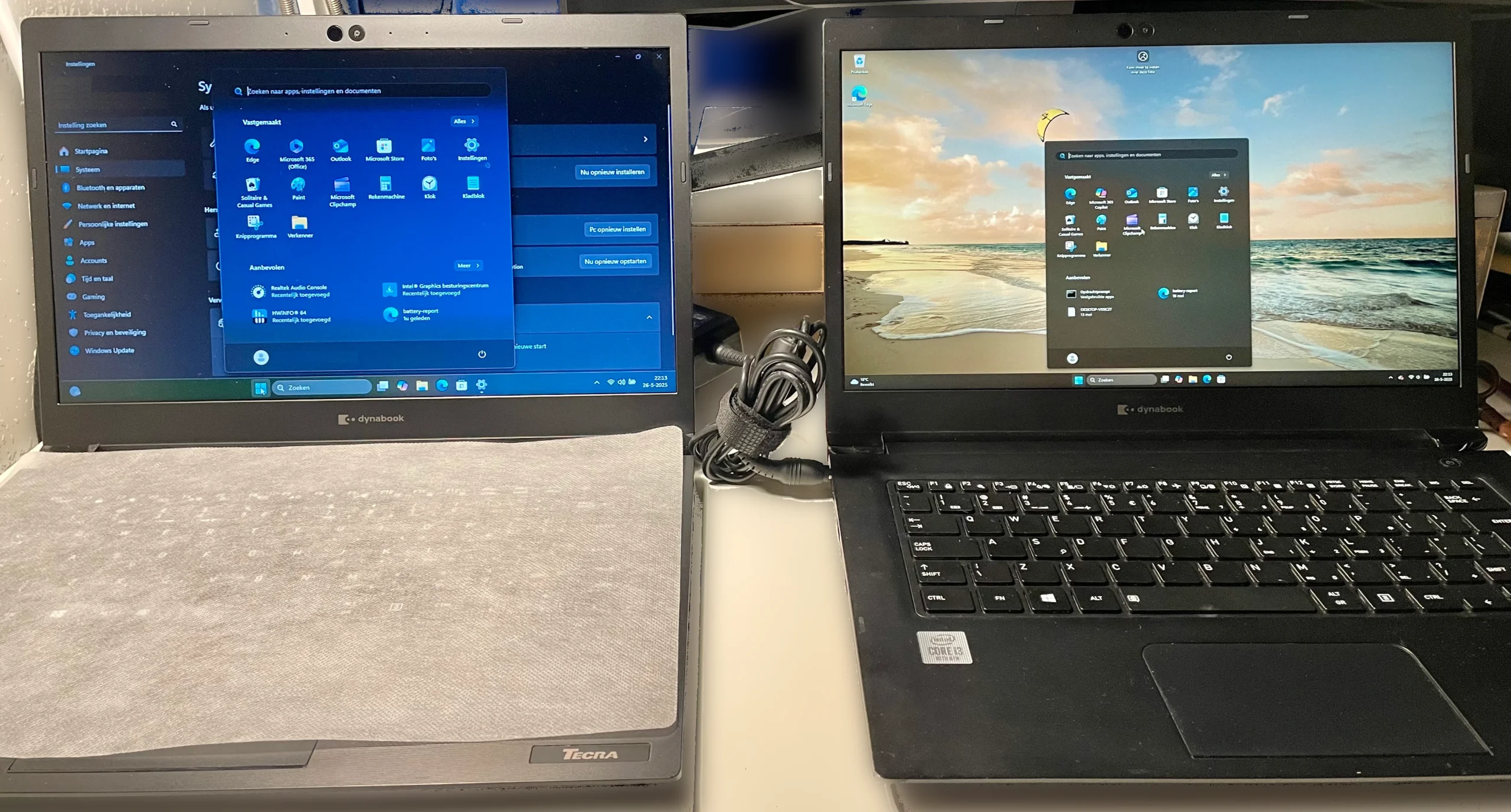
The Start Menu is also easier to see, as you can see in the photo below. On the Full HD screen the Start Menu takes up much less space, so you have more room for your work. You can fit more information on the same surface and read it better too.
🪄Tip: If the Full HD resolution makes the letters too small to read, you can set zoom so the characters on your screen become bigger and easier to read, without sacrificing resolution!
You can set this by clicking your right mouse button while your mouse is on the desktop. Then choose Display settings from the menu and go to Scale and layout. Here you can enter a zoom percentage that suits you!
Colour depth: 6-bit vs 8-bit panels
Not only the resolution, but also the colour reproduction plays a big role in how pleasant and realistic a screen looks. Many HD screens use so-called 6-bit panels, while Full HD screens more often have true 8-bit panels.
| Bit depth | Colours | Result |
|---|---|---|
| 6-bit | ~262,000 colours | More banding, unnatural transitions |
| 8-bit | ~16.7 million colours | Realistic colour gradations |
With 6-bit you often see colour banding in skies, for example, or transitions from light to dark. 8-bit produces much smoother and more natural images.
For the average user that simply means: photos look nicer, videos more realistic and websites fresher.
Colour gamut: sRGB, 45% vs 72%
Another important factor is the colour gamut – the range of colours a screen can display. This is often expressed as a percentage of the sRGB spectrum.
| sRGB coverage | Description |
|---|---|
| 45% sRGB | Mediocre colour reproduction |
| 72% sRGB | Good colour reproduction, vivid image |
| 100% sRGB | Professional level |
Many HD screens have only 45% sRGB coverage. That’s fine for an everyday user, but for photo and video editing we recommend at least 72% of the colour spectrum. We ourselves choose a screen with a 45% colour gamut as standard, because the majority of our customers are everyday users who want good value for money. This is also the standard in laptops in our price range. Want an upgrade? Then get in touch with us and we’ll be happy to advise you.
Touchscreen? Yes or no?
We also offer some laptops with a touchscreen. People who have one really don’t want anything else. You no longer have to drag the mouse somewhere, and with the right resolution and setup it’s very easy to work with. Do you like paying at self-checkout tills, or do you enjoy ordering with a tablet in a restaurant? Then a touchscreen is definitely worth considering.
Matte or glossy screen – even more clarity
Another factor that affects viewing comfort is the screen finish: matte (anti-glare) or glossy(glossy) and the brightness. We deal with these two together, because together they determine viewing comfort in different lighting.
- Glossy screens often look more contrasty and colourful and are therefore nice for photo and video editing. Their downside is that they reflect sunlight more easily.
- Matte screens have an anti-reflective layer, so you suffer far less from reflections. They’re more comfortable for long working sessions or in lit environments such as an office or by the window, and are therefore more suitable for word processing.
💡 Brightness is expressed in nits (cd/m²). The higher the number of nits, the better the screen is readable in bright ambient light.
- Below 200 nits: often too dark for comfortable working
- 250–300 nits: suitable for indoor use
- 300+ nits: great for brightly lit rooms or outdoor use
In TopLaptops we fit Full HD screens as standard, with a matte finish and a brightness of at least 250 nits. Our quality standards are all or nits, after all.
What gives you the best experience?
The best experience is, in any case, a screen with at least Full HD (1920 by 1080 pixels) resolution. All the other options like colour depth, colour gamut, touchscreen or finish depend on what you use your laptop for. It’s not that one is clearly worse than the others, or that you have to make really tough, mutually exclusive choices. But it is important that you have a laptop screen you can look at for a long time without getting square or rectangular eyes and a headache.
Even if you only use your laptop for email, internet and word processing, you’ll immediately notice that everythingfeels more pleasant and more professional and that your eyes tire less quickly from reading on a Full HD screen.
Want to upgrade your laptop screen to a better colour depth, colour gamut, touchscreen or brightness? Then get in touch with us and we’ll be happy to advise you!