
An accidental discovery during a price comparison brought a data breach to light at a large Dutch webshop. Customer details such as email addresses, names and order numbers were being sent along invisibly with product reviews, accessible via network traffic without ever appearing on the page. This type of mistake, known as excessive data exposure, is common and arises when systems send more data than necessary.
To prevent such leaks, three core lessons apply: limit data exchange to the strict minimum following the Principle of Least Privilege, prepare for incidents with backups and protocols, and build awareness on the work floor. Security isn’t the exclusive domain of IT, but requires practical measures such as two-factor authentication, regular updates and open communication about risks.
Customer data accidentally found on product pages in a webshop
I was busy collecting prices for further processing by reading out the product pages of a large Dutch webshop. That was a challenge in itself, but with a Python web scraper I was able to pull prices, weights and dimensions for over 600 items into a spreadsheet. Until something caught my eye that didn’t belong there.
In the page data I also found the product reviews – like “nice pool, five stars” – and it turned out the site was sending along more data, including email addresses, full names and order numbers. This information wasn’t visible on the page, but it was visible in the network traffic while the page was being built.
That is a data breach. And it’s a type of mistake that occurs astonishingly often — even at companies that think they have everything in order. In this blog I explain exactly what went wrong, why it happens so easily, and what you as an entrepreneur can do to prevent a data breach in your own webshop.
What happened under the hood
A modern webshop consists of two halves that talk to each other:
- The front: what you see in your browser (the ‘front-end’).
- The back: the server where all the data lives, including the customer database (the ‘back-end’).
When you open a product page, the front asks the back: “give me this product’s information to display.” If a product has reviews, those are passed along by the back-end too. The back pulls them from the database and sends them back. The problem was that the back returned the entire database record — including the email address and order number of the customer who wrote the review — while the front only showed the text and the stars.
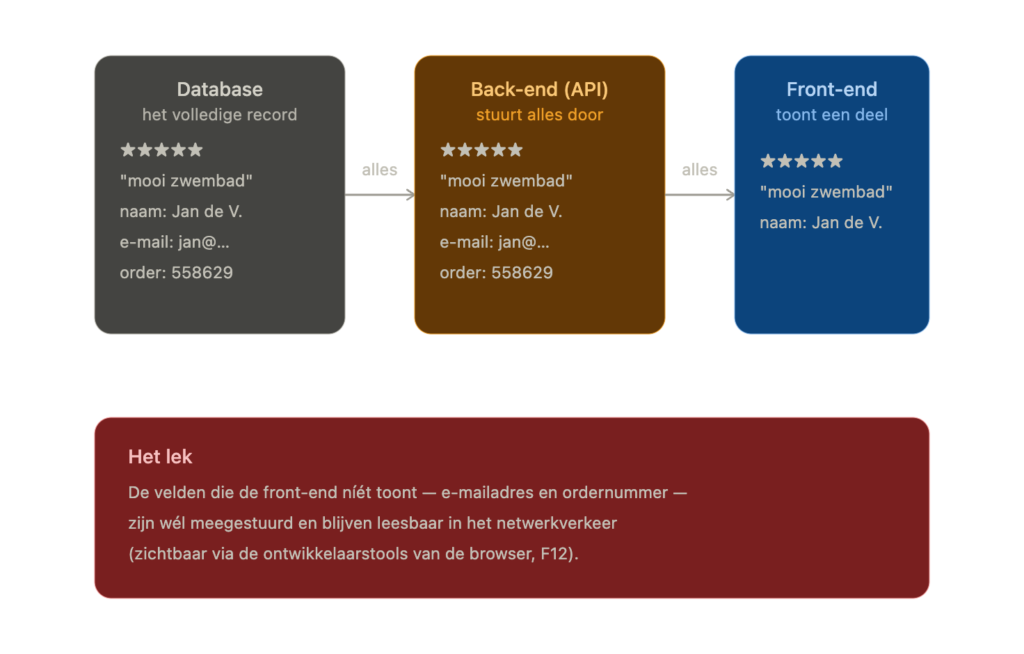
Anyone with Chrome (or, better still, Ungoogled Chromium) and an F12 key on their keyboard can view the “source” of a page: the raw data the back-end sends, before the front-end decides what is and isn’t shown. The reasoning error is understandable: “you can’t see it, so it isn’t there.” But not seeing something is not the same as it not being there. The hiding only happened at the last moment, in the browser — and that’s too late. The sensitive data should never have reached the browser in the first place.
Security people have a name for this: excessive data exposure. It sits firmly at number 1 on the list of most common API mistakes. The fix in this case was small — a few lines of code so the server only sends the fields that are genuinely needed. But you do have to know about it. So here are a few “lessons learned”, the kind you draw up after an incident to learn from it.
Lesson 1: never give away more than necessary
This may well be the most important principle in this whole story, and it applies to every connection in your business — your webshop, your accounting package, your newsletter system, your stock management.
Only send and store what you really need. Does the product page only need the name and the text of a review? Then send only that. Not the email address “just in case”. Not the order number “because it’s in the database anyway”. The fewer details travelling around, the less can leak.
This principle has a name, and if you remember one term from this blog, let it be this one: PoLP — the Principle of Least Privilege. The rule is simple: every destination for information — whether it’s a piece of software or a person — gets exactly what it needs to do the job, and not a letter more.
A review page is fine with the product name, the number of stars and the review text. It doesn’t need more, so it doesn’t get more — no email address, no order number. And it applies just as much to people: a bank’s front-desk employee can’t simply access the investment data of private-banking clients; that isn’t needed for the job.1
It’s not only about who has access, but also for how long. During order handling, logistics has temporary access to ship the order, but once it’s handled the order disappears from their system. Only administration keeps access for bookkeeping, returns or warranty. Unnecessary access is like an open window — a risk you simply avoid.
Go through this in your organisation — who can access which files, which connection forwards which data, which employee has access to which system — and you’ve already covered the vast majority of the risks.
Lesson 2: just assume that one day it will go wrong
I once got this advice from a director I learned a great deal from: assume that something will go wrong one day, and make sure you’re ready for it.
Many people think: “security means that nothing must ever happen.” That isn’t achievable, and that idea only paralyses you. Bringing a risk down to zero is financially and technically impossible — and it doesn’t need to be.
A leak, a hacked password, a lost laptop — it happens to the best companies. The difference between a business that survives it and one that goes under isn’t whether it happens, but what’s ready when it does:
- Do you have backups or snapshots that you can actually restore (and have you ever tested that)?
- Do you know who to call when something goes wrong?
- Can you see back what happened in your log files?
- Do you know what you’re legally required to do in the event of a data breach? (Spoiler: you have 72 hours to report it to the Dutch Data Protection Authority.)
This might sound like a lot, but it’s exactly the same as a fire extinguisher in your shop. You don’t expect a fire. But you’ve got one anyway.
Lesson 3: security starts on the work floor, not with IT
A persistent misconception is that cybersecurity is “something technical” that you leave to the IT department or your web agency. But most incidents don’t start with sophisticated hackers at all — they start with everyday things: an employee clicking a fake link, a password being reused, an old plugin nobody updated, or a self-hosted password vault that’s accidentally reachable across the entire internet and simply findable in a search engine (all real examples I’ve come across in practice).
Concretely, and without spending a cent on expensive software:
- Use a password manager and never the same password twice. This is the cheapest, biggest security win there is. Take a look at Vaultwarden, for example, a free and open-source variant of Bitwarden.
- Even better:
- Turn on two-factor authentication on everything that offers it — your email, your webshop admin, your bank. Can you log in with one-time codes (OTP) or, better still, passkeys! Do that. Remembering or keeping track of passwords isn’t fun anyway.
- Keep everything updated. Outdated software (think: old WordPress plugins) is the most-used break-in route there is.
- Make it discussable. A team that knows it’s okay to say “I accidentally clicked on something weird” catches problems early. A team that hides it out of shame does not.
And if you don’t know where to start?
This story began when I happened to notice something and reported it properly. But of course you don’t want to depend on the chance that a friendly passer-by spots your leak before someone with bad intentions does.
I help entrepreneurs — webshops, SMEs, really anyone with customer data — to get a grip on this. No endless reports or thick slide decks, just a practical look: where is your data, what travels around, what’s needed to be GDPR-compliant, and what are the few things you need to sort out right now. A kind of MOT for your digital business.
Would you rather figure it out yourself? Brilliant — that only makes me happy, and I’m glad to think along with you, no strings attached. Cybersecurity isn’t a secret art; it’s mostly a matter of the right habits and knowing what to look out for.
Do you run a webshop or store customer data and just want to know whether it’s all in order? Call or email me. Then we’ll look together at whether a digital window is open somewhere and your valuable data is exposed.
Boyd is working towards the Certified in Cybersecurity (CC) certification from (ISC)² and helps entrepreneurs with, among other things, GDPR questions, digital autonomy and sovereignty through self-hosting and EU-based IT solutions.
- Bunq thought otherwise: https://nos.nl/artikel/2526294-bunq-medewerkers-gluurden-in-rekeningen-van-klanten
↩︎